



The warning looks like this, and if you work in React or Next.js you have seen it many times:
React Hook useEffect has a missing dependency: 'userId'. Either include it or remove the dependency array
  react-hooks/exhaustive-deps
It comes from the react-hooks/exhaustive-deps ESLint rule. Next.js ships it in
eslint-config-next, and Vite's React template enables it too. The rule compares the values an effect reads
with the values in its dependency array. When one is missing, React keeps running the effect with an old copy of that
value. That is a bug, even when the page looks fine today.
The rule tells you what is missing. It doesn't tell you which of the usual fixes is right, and some of the quick fixes cause an infinite loop. To get this post's examples and messages right, I ran the rule (eslint-plugin-react-hooks 7.1.1, React 19.3.1) against ten small components. Every warning quoted below is copied from that run.
What the rule flags and what it ignores
The rule only asks for values that can change between renders. Some values are known to be stable, so it never asks for them. This is what came back for each case:
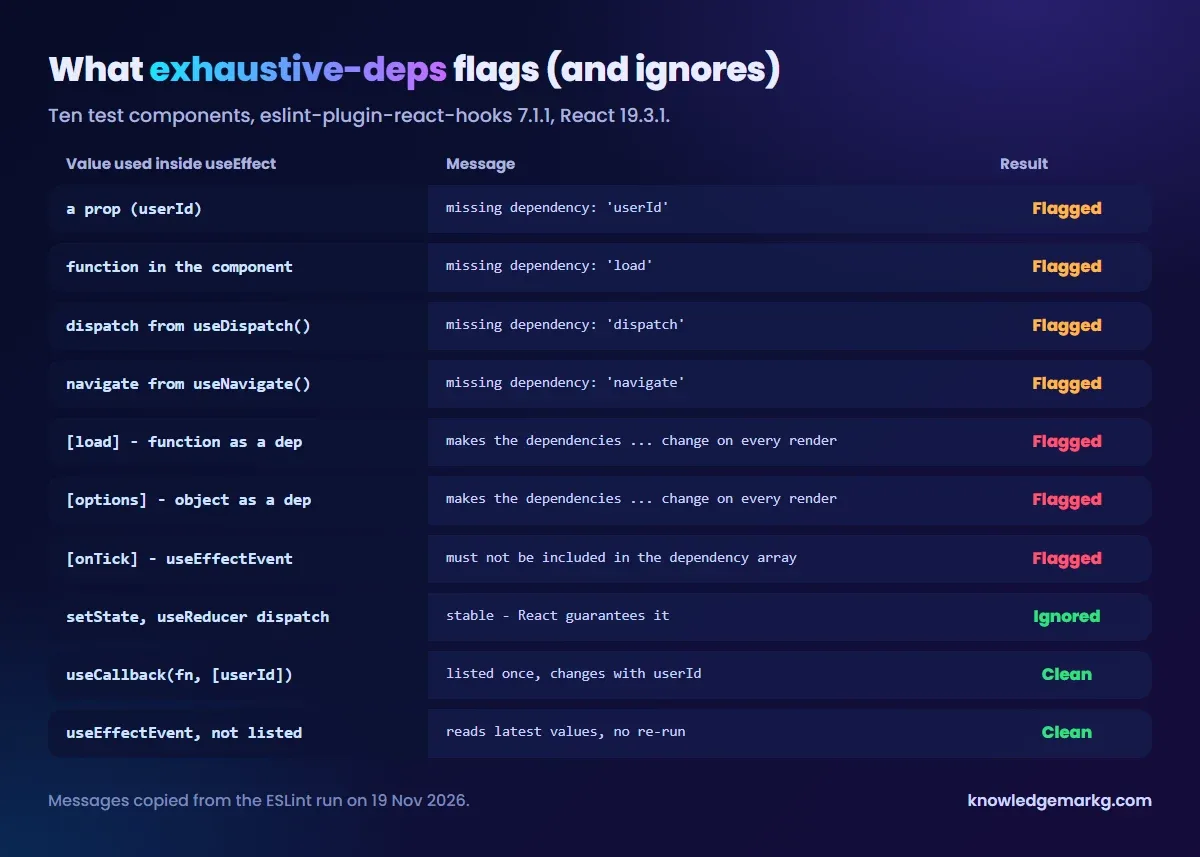
The two dispatch results are worth noticing. A dispatch from useReducer is
not flagged, because React guarantees it never changes. A dispatch from Redux's
useDispatch() is flagged. It comes from a custom hook, and the rule can't see inside one.
navigate from React Router is flagged for the same reason. If you search "missing dependency dispatch" or
"missing dependency navigate", that is why.
Fix 1: add the dependency (most of the time this is the answer)
This is the most common case: a prop or state value is used inside the effect but missing from the array.
function Profile({ userId }) {
  const [name, setName] = useState("");

  useEffect(() => {
    fetchUser(userId).then((u) => setName(u.name));
  }, []); // warning: missing dependency 'userId'

  return <p>{name}</p>;
}
The empty array means "run once". So when userId changes, the profile keeps showing the first user's
name. Adding userId fixes the bug. Once the effect can run more than once, also add a cleanup flag, so a
slow response for the old user can't overwrite the new one:
useEffect(() => {
  let ignore = false;
  fetchUser(userId).then((u) => {
    if (!ignore) setName(u.name);
  });
  return () => {
    ignore = true; // a slower, older request can't overwrite the newer one
  };
}, [userId]);
If adding the dependency makes the effect run too often, don't remove it. The effect is reading something it shouldn't depend on, and the fixes below deal with that.
Fix 2: move the function inside the effect
The second most common message names a function, not a value. Adding the function just swaps one warning for another:
function load() {
  fetchUser(userId).then((u) => setName(u.name));
}

useEffect(() => {
  load();
}, []); // missing dependency: 'load'

useEffect(() => {
  load();
}, [load]); // The 'load' function makes the dependencies of useEffect Hook
            // change on every render.
A function declared in the component is a new object on every render. Listing it makes the effect run on every
render. If that function sets state, the effect never stops re-running. That is the infinite loop people get after
"fixing" the warning. If only the effect uses the function, move it inside. The real dependency, userId,
then shows up in the array:
useEffect(() => {
  function load() {
    fetchUser(userId).then((u) => setName(u.name));
  }
  load();
}, [userId]);Fix 3: useCallback or useMemo when the value is shared
If the function is also used elsewhere, for example by a "Refresh" button, wrap it in useCallback. It
then only changes when its own inputs change, and the rule is satisfied:
const load = useCallback(() => {
  fetchUser(userId).then((u) => setName(u.name));
}, [userId]);

useEffect(() => {
  load();
}, [load]); // no warning: load only changes when userId does
An object or array built during render has the same problem, and the warning says so:
const options = { id, limit: 10 };
useEffect(() => {
  search(options);
}, [options]);
// The 'options' object makes the dependencies of useEffect Hook change on every render.

// Fix: depend on the primitives, build the object inside
useEffect(() => {
  search({ id, limit: 10 });
}, [id]);
Depending on the primitive values (id) is usually cleaner than wrapping the object in
useMemo. Keep useMemo for a value that is expensive to compute or used in several places.
That is the practical answer to "useCallback vs useMemo": useCallback keeps a function's identity,
useMemo keeps a computed value's.
Fix 4: useEffectEvent for values you read but don't react to
Sometimes an effect needs the latest value of something, but that value changing is not a reason to re-run it. A timer that logs the current count, or a chat connection that reports the current theme, are typical examples. Listing the value would restart the timer or reconnect on every change.
React 19.2 added useEffectEvent for exactly this. Put the code that reads those values in an Effect Event
and call it from the effect. It always sees the latest values, and the rule doesn't ask you to list it:
import { useEffect, useEffectEvent } from "react";

function Ticker({ roomId, count }) {
  // reads the latest roomId and count, but is not a reason to restart the timer
  const onTick = useEffectEvent(() => {
    log(roomId, count);
  });

  useEffect(() => {
    const t = setInterval(onTick, 1000);
    return () => clearInterval(t);
  }, []); // no warning

  // ...
}
Listing it anyway is a mistake the rule catches, with its own message:
}, [onTick]);
// Functions returned from `useEffectEvent` must not be included in the dependency array.
// Remove `onTick` from the list
Effect Events are only for code called from inside effects. Don't use them to hide a value the effect really
depends on. In the example above, if a new roomId should start a new connection, roomId
belongs in the array.
Fix 5: dispatch and navigate: just list them
For the two custom-hook values in the table, the fix is simply to add them:
const dispatch = useDispatch();          // Redux: flagged
const [state, localDispatch] = useReducer(reducer, init);  // not flagged

useEffect(() => {
  dispatch({ type: "init" });
  localDispatch({ type: "init" });
}, [dispatch]); // add dispatch; localDispatch never needs listing
Redux documents that dispatch stays the same as long as the store does, so listing it never causes an
extra run. Listing navigate is also correct. If its identity ever changes, the effect runs again, which
is harmless for a redirect guard like "send logged-out users to /login". Disabling the rule to avoid typing one word
leaves a warning comment in your code for no benefit.
Why eslint-disable is the wrong fix (and stopped working)
The old shortcut was a comment that switches off the rule for one line. With the plugin's current recommended
preset, that comment hides one warning and leaves the bigger problem in place. In my test, an effect that only set
state from a prop had its exhaustive-deps warning disabled, and the build still reported this
error:
useEffect(() => {
  setN(userId.length);
}, []); // eslint-disable-line react-hooks/exhaustive-deps

// still reported with the recommended preset:
// error  Error: Calling setState synchronously within an effect can trigger cascading renders
//   react-hooks/set-state-in-effect
That rule is pointing at the real fix. A value calculated from props during render doesn't belong in an effect at all:
// no effect, no dependency array, no warning
const n = userId.length;
React's own guide on this, You Might Not Need an Effect, covers the other cases: data you can calculate, state that resets when a prop changes, and work that belongs in an event handler. Most "missing dependency" warnings in real projects disappear once the effect is gone.
What I found in this site's own code
It seemed fair to check my own projects too. This site runs on Next.js 16, whose ESLint config ships the same plugin
version I tested. Its source has five eslint-disable comments for exhaustive-deps and three
for set-state-in-effect, all in admin screens and data hooks.
- Four sit on
useCallbackloaders that read a wholepropsobject but list only three of its fields. That is the "missing dependency: 'props'" case. The fix is to destructure the fields and list them. - One is a rich-text editor effect that leaves the editor instance out on purpose, so typing doesn't reset the
cursor. That is the job
useEffectEventwas made for. - Of the three
set-state-in-effectones, one sets state after anawait, which isn't the synchronous cascade the rule guards against. The other two read something that only exists in the browser after mount: headings in injected article HTML, andnavigator.platform. Each comment says why.
None of them is a live bug today, but each one is a place where the next change could quietly read a stale value. They are on the list. When a React build behaves differently in production than locally, it is often a different problem: stale cached HTML pointing at old chunks, covered in ChunkLoadError after a Next.js deploy, or a page served from the cache, covered in Next.js page not updating.
Quick decision list
- The missing value should re-run the effect (a prop, an id, a query): add it, and add a cleanup if the effect fetches.
- The missing value is a function only the effect uses: move the function inside the effect.
- The function or object is shared:
useCallbackfor functions; depend on primitives, oruseMemo, for objects. - The effect needs the latest value but shouldn't re-run when it changes:
useEffectEvent(React 19.2+). - dispatch or navigate: list them.
- The effect only calculates state from props: delete the effect and calculate during render.



Join the conversation
No comments yet — be the first to share what you think.