


Cloudflare Email Routing gives you addresses like hello@yourdomain.com that land in the Gmail inbox
you already use, with no mailbox to pay for. It takes about ten minutes when the domain is fresh. It takes longer
when the domain already had email somewhere else, and that's where most "not working" threads start.
I moved this site's domain to it on 16 November 2026, off a hosting mail setup whose MX, it turned out, pointed somewhere that couldn't receive mail. Below is the setup, the DNS that changed, the checks to run when mail doesn't arrive, and the part most guides skip: Email Routing only receives. Replying as your domain is a separate job.
The short version
- Free? Yes, on every Cloudflare plan. The catch is that your domain's DNS must be on Cloudflare (nameservers pointed at Cloudflare).
- What it does: accepts mail for your domain and forwards it to a verified address such as your Gmail. It can also drop a message or hand it to a Worker.
- What it doesn't do: send. Cloudflare's docs say plainly that Email Routing "does not support sending or replying from your Cloudflare domain". Replies go out from your Gmail address unless you set up sending separately.
- Limits: 200 routing rules per domain, 200 destination addresses per account (shared across your domains), 25 MiB per message.
How the mail actually travels
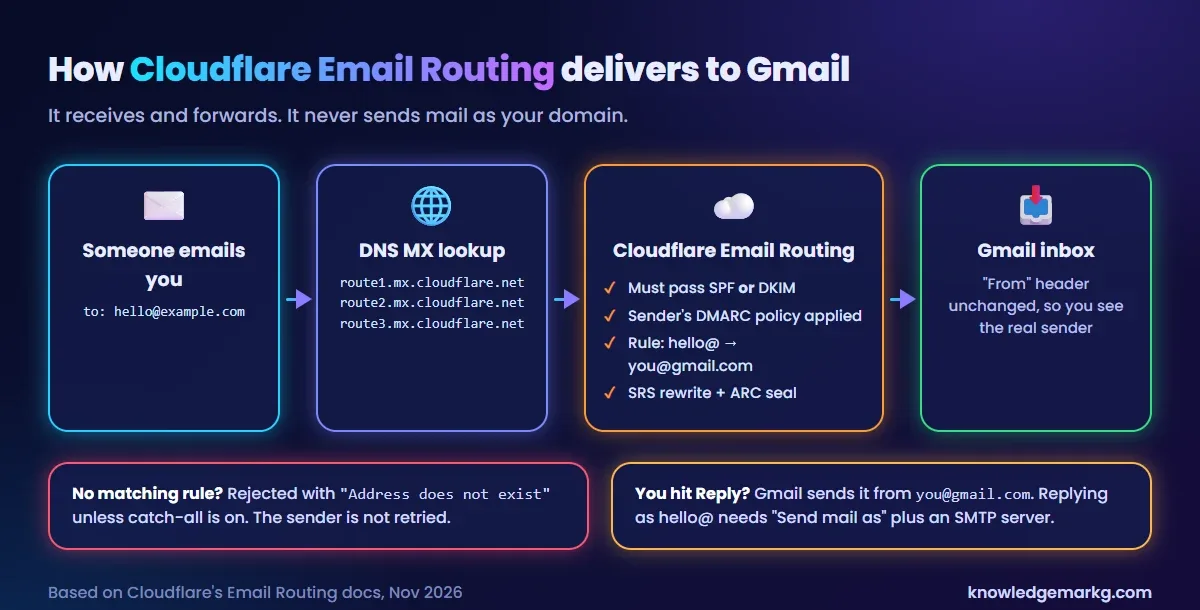
Three details in that picture explain most of the problems people hit later:
- Cloudflare checks the sender. A message has to pass SPF or carry a valid DKIM signature, and the sender's own DMARC policy is enforced. Mail that fails is rejected at Cloudflare and never reaches Gmail. That's usually spam, but a badly configured sender can lose mail here too.
- The envelope is rewritten, the From line isn't. Cloudflare uses SRS (Sender Rewriting Scheme) so the forward passes SPF at Gmail, and adds an ARC seal that records the checks it did. You still see the real sender in Gmail.
- An address with no rule bounces. Mail to
sales@when you only madehello@is rejected with "Address does not exist", unless you turn on catch-all.
Set it up: Cloudflare Email Routing to Gmail
- Get the domain onto Cloudflare DNS. Add the site in Cloudflare and change the nameservers at your registrar. Email Routing isn't available for a domain that only uses Cloudflare as a CDN in front of another DNS provider.
- Open Email Routing. In the dashboard, pick the domain, then Email › Email Routing and start the setup.
- Create the address. Enter the custom address (
hello), choose Send to an email, and type the Gmail address it should forward to. - Verify the destination. Cloudflare emails the Gmail address. Click Verify email address in that message. Until you do, any rule that points at it stays disabled. If the mail never arrives, check Spam, then resend it from Destination addresses.
- Let it add the DNS records. The wizard adds three MX records, an SPF TXT record and a DKIM key. Once onboarding succeeds, those records are locked in the DNS tab so they can't be deleted by accident.
- Test from a different account. Send to
hello@from Outlook, a phone's mail app or a second Gmail account. Sending from the same Gmail you forward to is a bad test (more on that below).
Want more addresses? Add one rule each, up to 200. Each rule forwards to one destination; sending one message
to two inboxes takes a Worker that calls forward() twice. Subaddressing
(hello+invoices@ matching the hello@ rule) is a toggle in Email Routing settings, and
catch-all works only on the root domain, not on subdomains.
Moving from another mail host: error 2008 and the orange cloud
If the domain already had MX records from your host, Google or Zoho, onboarding stops with error 2008: "Non-Cloudflare MX records exist". Email Routing needs to be the only MX for the root domain. Cloudflare's own fix is to delete the old MX records and enable Email Routing straight away, because mail has nowhere to go in between.
Before deleting anything, check whether the old setup was even working. Here's what this domain had:
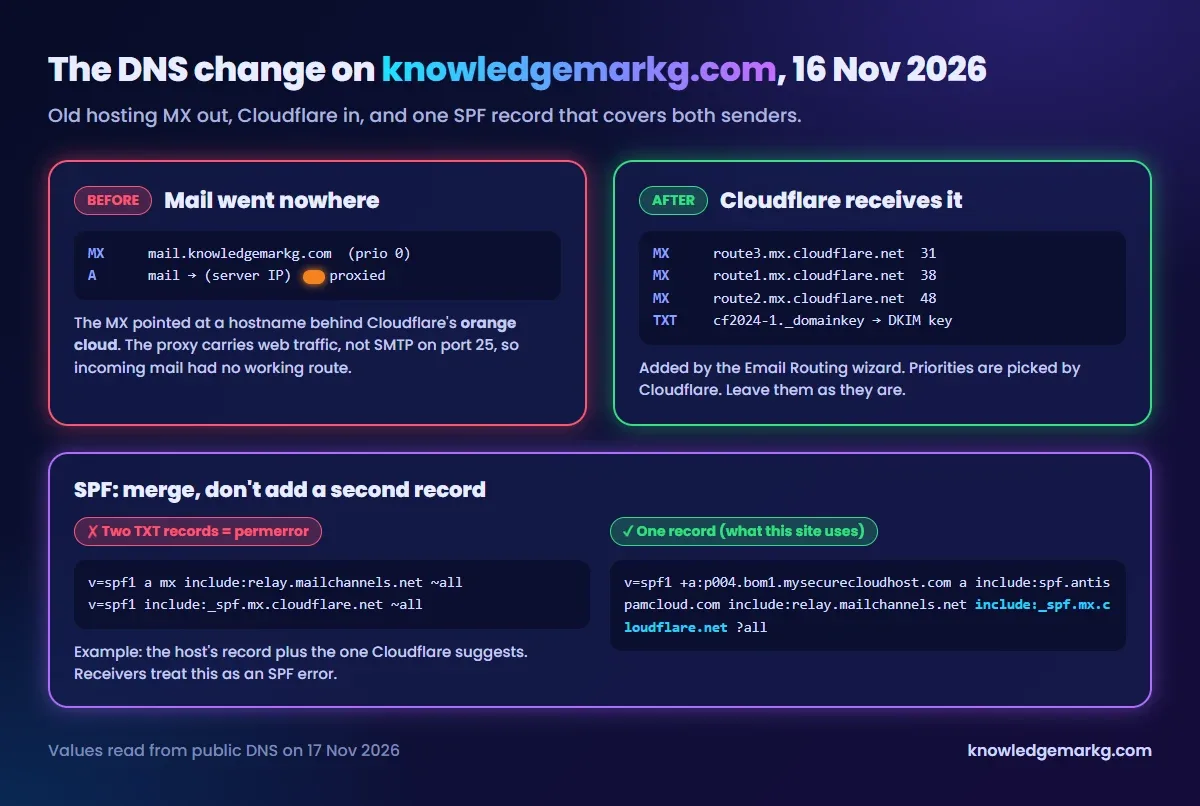
The old MX pointed at mail.knowledgemarkg.com, and that hostname was an A record with Cloudflare's
proxy switched on (the orange cloud). Cloudflare's proxy carries web traffic. It doesn't accept SMTP on port 25,
so mail servers trying to deliver to it got nowhere. If your MX points at a proxied name, your mail is already
broken, and moving to Email Routing loses nothing.
If you keep a mailbox at your host and only want forwarding for some addresses, Email Routing isn't the right
tool. It takes over every address on the root domain. Use a subdomain for it (@mail.example.com) or
forwarding at your existing host.
SPF: one record, merged
This is the mistake behind a lot of "my mail goes to spam" comments. A domain can have only one SPF record. If your host or Google Workspace already published one and you add Cloudflare's as a second TXT record, receivers return a permerror and treat SPF as broken. Cloudflare's troubleshooting page says multiple SPF records "will prevent Email Service from working properly".
# Wrong: two SPF records (receivers return permerror)
v=spf1 include:_spf.google.com ~all
v=spf1 include:_spf.mx.cloudflare.net ~all

# Right: one record with both
v=spf1 include:_spf.google.com include:_spf.mx.cloudflare.net ~all
Merge the include: parts into a single v=spf1 line. On this site that meant keeping the
hosting server's entries, because the server can still send mail for the domain (forms, notifications), and adding
include:_spf.mx.cloudflare.net to the same line. Two more rules: SPF allows at most 10 DNS lookups
in total (each include, a and mx counts), and the record should end in
~all or -all, never +all.
Check what's live with:
# MX: should list only route1/2/3.mx.cloudflare.net
dig MX example.com +short

# SPF: exactly one line should start with v=spf1
dig TXT example.com +short | grep spf1

# DKIM key that the Email Routing wizard adds
dig TXT cf2024-1._domainkey.example.com +short

# On Windows without dig
nslookup -type=MX example.com
nslookup -type=TXT example.com
DKIM and DMARC
The cf2024-1._domainkey record is the public key Cloudflare uses to sign forwarded mail for your
domain. Leave it alone; if it's missing, copy it again from Email Routing settings.
Email Routing doesn't create a DMARC record for you. This domain doesn't have one yet either. If you add one, start with monitoring only and tighten it once the reports show every sender you use passes:
Type:  TXT
Name:  _dmarc
Value: v=DMARC1; p=none; rua=mailto:dmarc-reports@example.com
Jumping straight to p=reject is how people break their own replies (see the send-as section). It
doesn't affect mail you receive: Cloudflare checks the sender's DMARC, not yours.
Cloudflare Email Routing not working? Check in this order
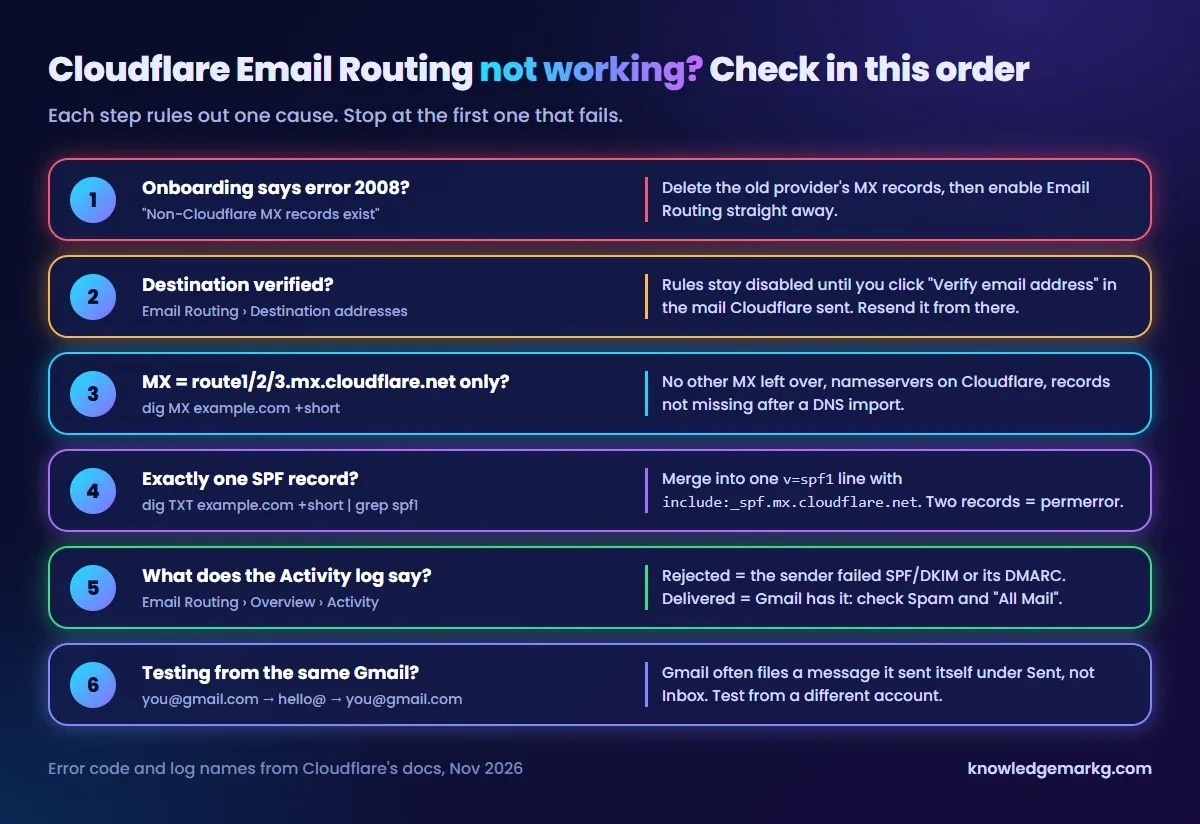
- Error 2008 during setup. Old MX records are still there. Delete them, then finish onboarding.
- Destination not verified. The rule shows as disabled. Find the verification mail (Spam, Promotions) or resend it.
- Wrong or extra MX.
dig MXshould show only the threeroute*.mx.cloudflare.nethosts. A DNS import can bring back an old record, and mail still reaching a dead server is often an old MX with a lower priority number. - Two SPF records. Merge them as above.
- Read the activity log. Email Routing's overview lists each message with its result. Rejected means the sender failed SPF/DKIM or its own DMARC, and you can't fix that on your side. Delivered means Gmail accepted it. A "Delivered" status doesn't guarantee the inbox, so look in Spam and All Mail.
- Testing from the same Gmail. If you send from
you@gmail.comtohello@and it forwards back toyou@gmail.com, Gmail often shows it only under Sent, because it sees a message you already have. It looks like a failure but isn't one. Test from another account.
Still stuck after all six? Check Cloudflare's status page. Email Routing has had incidents with delivery to Gmail before, and nothing in your DNS fixes those.
Replying as hello@yourdomain
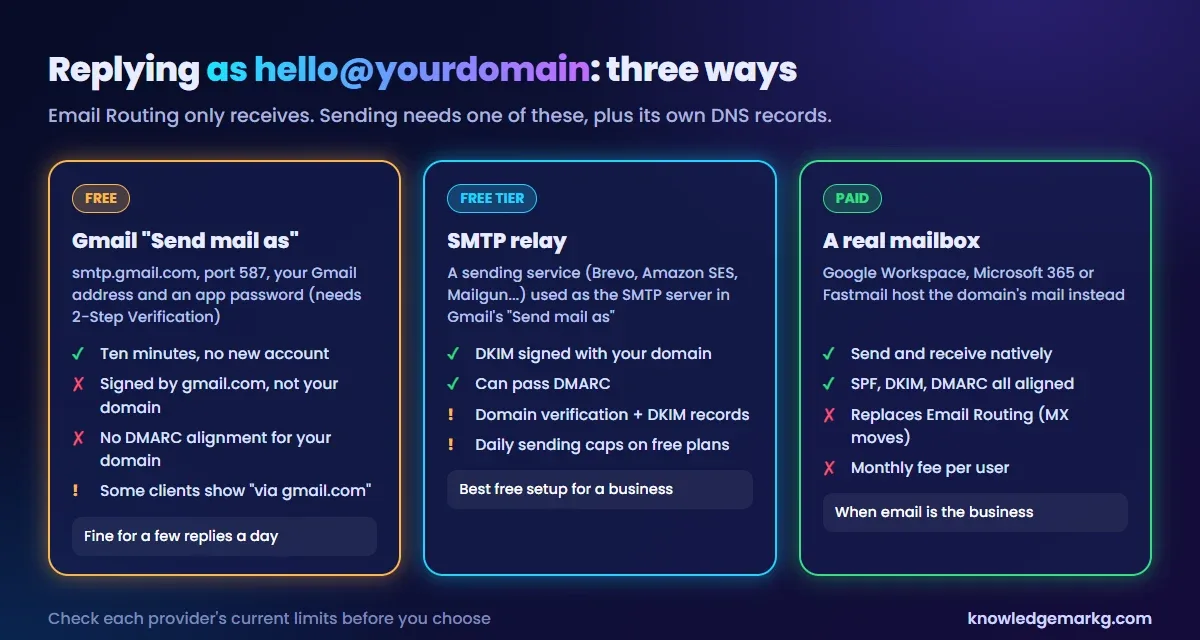
Hit Reply on a forwarded message and Gmail sends it from your Gmail address. Your client sees
you@gmail.com, not hello@. There are three ways to change that.
1. Gmail's "Send mail as" through Google's SMTP (free)
Turn on 2-Step Verification for the Google account and create an app password. Then go to Gmail
Settings › See all settings › Accounts and Import › Send mail as › Add another
email address, enter hello@yourdomain.com, and use:
SMTP Server:  smtp.gmail.com
Port:         587  (TLS)
Username:     you@gmail.com
Password:     the 16-character app password (not your Google password)
Gmail mails a confirmation code to hello@. Email Routing forwards it straight back to the same inbox,
which is a handy end-to-end test of the forwarding.
The catch most guides gloss over: this mail is still sent and signed by Google as gmail.com. The DKIM
signature is for gmail.com, not your domain, and SPF is checked against the sending envelope, not the From line you
picked. So adding include:_spf.google.com to your SPF record, which almost every tutorial tells you
to do, doesn't make the message line up with your domain for DMARC. With no DMARC record, or p=none,
that's mostly harmless for a few replies a day. With p=quarantine or p=reject, your own
replies can start landing in spam. Check it yourself: send a test to another account, open Show
original, and look at the DMARC line and the DKIM d= domain. (I haven't set this up on this
domain, so I'm describing how the checks work, not a result from my own inbox.)
2. An SMTP relay (free tier)
A sending service such as Brevo, Amazon SES or Mailgun lets you verify the domain and publish its DKIM record.
Mail you send through it is signed with your own domain and can pass DMARC properly. You put the relay's SMTP
host and credentials into the same Gmail "Send mail as" form instead of smtp.gmail.com. Expect a
daily sending cap on free plans, and remember the relay's SPF include also counts toward the 10-lookup limit.
3. A real mailbox (paid)
If email is central to the business (several people, shared inboxes, lots of outgoing mail), a hosted mailbox such as Google Workspace or Microsoft 365 does both directions natively. It replaces Email Routing, because the MX records move to that provider.
Is Cloudflare Email Routing reliable enough for a business?
For receiving, yes, with two caveats. There's no mailbox, so nothing is stored on Cloudflare's side: if Gmail rejects a forward, Cloudflare doesn't send a non-delivery report back to the original sender, and the message is simply gone. And mail that fails the sender checks never reaches you, which is what you want for spam but not for a client with a broken mail setup. For a freelancer or a small site that wants a professional address, it's a sound free choice. If you need to send a lot as your domain, budget for option 2 or 3 above.
If you're setting up a new site, the difference between where your domain, DNS and website live is explained in domain vs hosting. And if Cloudflare also sits in front of your website, does Cloudflare cache 404 responses and why cf-cache-status says DYNAMIC cover the caching side.



Join the conversation
No comments yet — be the first to share what you think.