


You run npm run dev or node server.js and Node stops with
Error: listen EADDRINUSE: address already in use :::3000. It means exactly what it says: another
process is already listening on port 3000. Most of the time that's an old copy of your own dev server that didn't
shut down. The fix is to find that process and stop it, or to run on another port.
On 21 November 2026 I reproduced it on a Windows 11 PC with Node 22.17.1 and a three-line HTTP server, and tried every way of finding and freeing the port. Two results surprised me: Windows let a second server start on the same port without any error, and a "permission denied" error that looks related turned out to be a port Windows had reserved. Every output below is copied from that test.
What "EADDRINUSE: address already in use :::3000" means
node:events:496
      throw er; // Unhandled 'error' event
      ^

Error: listen EADDRINUSE: address already in use :::3000
    at Server.setupListenHandle [as _listen2] (node:net:1940:16)
    at listenInCluster (node:net:1997:12)
    at Server.listen (node:net:2102:7)
    ...
  code: 'EADDRINUSE',
  errno: -4091,
  syscall: 'listen',
  address: '::',
  port: 3000
}
EADDRINUSE is the operating system refusing the listen() call. :::3000 is
not a typo: :: is the IPv6 "any address", and Node's default listen(3000) binds it. On
Windows that one socket also covers IPv4, which is why netstat shows the port twice for the same
process (below). If you see 0.0.0.0:3000 or 127.0.0.1:3000 instead, your code passed a
host.
The common causes, roughly in the order I'd check them:
- Your previous dev server is still running. A terminal tab you forgot, or a window you closed while the process kept going.
- Two projects want the same default port. 3000 is the default for Next.js, Create React App, Express examples and many others.
- A watcher restarted too fast (nodemon and similar) and the old process hadn't released the port yet.
Fix it on Windows: find the PID, then stop it
In Command Prompt, netstat -ano lists every connection with its process ID (PID) in the last
column. Filter it to the port, check what the PID is, then stop it:
C:\>netstat -ano | findstr :3000
  TCP    0.0.0.0:3000           0.0.0.0:0              LISTENING       88520
  TCP    [::]:3000              [::]:0                 LISTENING       88520

C:\>tasklist /FI "PID eq 88520"
Image Name                     PID Session Name        Session#    Mem Usage
========================= ======== ================ =========== ============
node.exe                     88520 Console                    1     31,148 K

C:\>taskkill /PID 88520 /F
SUCCESS: The process with PID 88520 has been terminated.
After the taskkill, node server.js started on 3000 again. /F forces it;
check the image name with tasklist first so you don't stop something you need. If the PID belongs to a
service or a program you recognise, close it normally instead.
The PowerShell version
PowerShell has a cmdlet that returns the owning process directly, so you don't have to read columns:
# see who owns the port
Get-NetTCPConnection -LocalPort 3000 -State Listen |
  Select-Object LocalAddress, LocalPort, OwningProcess

# stop it (every process listening on 3000)
Get-NetTCPConnection -LocalPort 3000 -State Listen |
  Select-Object -ExpandProperty OwningProcess -Unique |
  ForEach-Object { Stop-Process -Id $_ -Force -PassThru }
LocalAddress LocalPort OwningProcess
------------ --------- -------------
:: 3000 88520The second command found node (PID 87768 in that run) and stopped it, and nothing was listening on 3000 afterwards. It stops every process listening on that port, so look at the first command's output before you run it.
In Git Bash, double the slashes
netstat -ano | findstr :3000 works the same in Git Bash, but taskkill doesn't. Git Bash
converts arguments that start with / into Windows paths, so /PID becomes a folder:
$ taskkill /PID 79808 /F
ERROR: Invalid argument/option - 'C:/Program Files/Git/PID'.
Type "TASKKILL /?" for usage.

$ taskkill //PID 79808 //F
SUCCESS: The process with PID 79808 has been terminated.
Writing //PID and //F stops the conversion. This is the "kill process on port windows git
bash" problem in one line.
Or just use another port
If you don't need 3000 specifically, change the port instead of stopping anything. Most tools read
PORT: set PORT=3001&& npm start in cmd, $env:PORT=3001; npm start in
PowerShell. One cmd quirk: set PORT=3001 && ... stores "3001 " with a trailing
space. Node 22 still listened on 3001 when I tried it, but a stricter tool might not, so
set PORT=3001&& npm start (no space before &&) is the safe spelling. Next.js
picks a port for you, with a catch:
C:\app>npx next dev
 ⚠ Port 3000 is in use by process 88580, using available port 3001 instead.
 ▲ Next.js 16.3.3 (Turbopack)
 - Local:         http://localhost:3001
C:\app>npx next dev -p 3000
⨯ Failed to start server
Error: listen EADDRINUSE: address already in use :::3000With plain next dev, Next.js 16.3.3 moved to 3001 by itself and even named the PID holding 3000.
With an explicit -p 3000 it refused and stopped with the same EADDRINUSE error. So if your
package.json script says next dev -p 3000, you'll see the error; if it says
next dev, you'll get a warning and a different port, which is easy to miss if you keep a bookmark to
localhost:3000 open.
The trap: two servers on port 3000 and no error at all
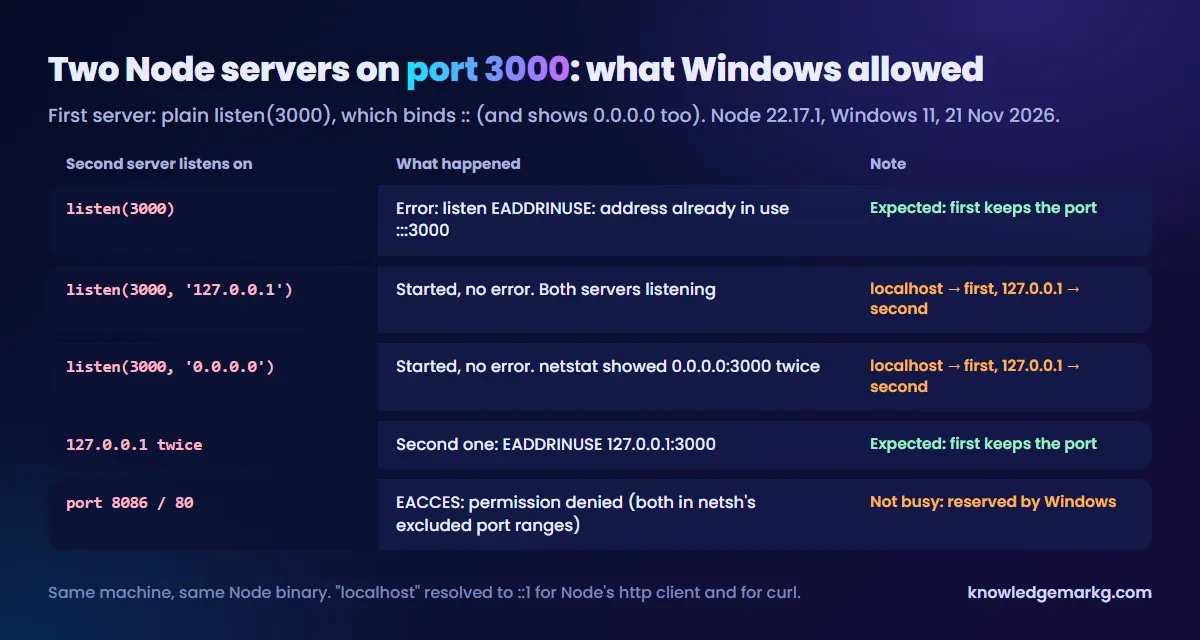
This is the one that cost me the most head-scratching. With the first server still running on the default
::, I started a second one with listen(3000, "127.0.0.1"). It started. No EADDRINUSE. Then
I tried listen(3000, "0.0.0.0"), and that started too:
C:\>netstat -ano | findstr LISTENING | findstr :3000
  TCP    0.0.0.0:3000           0.0.0.0:0              LISTENING       4904
  TCP    0.0.0.0:3000           0.0.0.0:0              LISTENING       85268
  TCP    [::]:3000              [::]:0                 LISTENING       4904
Two different PIDs on 0.0.0.0:3000. Which server you reach then depends on the address you use:
http://localhost:3000 went to the first server (localhost resolved to ::1, both for Node's
HTTP client and for curl), and http://127.0.0.1:3000 went to the second. Only an exact repeat of the same
address, 127.0.0.1 twice, gave the expected EADDRINUSE ... 127.0.0.1:3000.
What this means in practice: if one of your apps sets a host (many configs use HOST=127.0.0.1 or
0.0.0.0) and an old copy is still running on the default, both run quietly, and the address in your
browser decides which one you're looking at. The symptom is "my changes don't show up". I tested this with Node and
curl, not with a browser, so I can't say which one a given browser picks for localhost. The fix is the
same as above: netstat -ano | findstr :3000 and look for more than one PID.
listen EACCES: permission denied (a different problem)
This one looks related but isn't about a busy port. Windows keeps a list of excluded port ranges that no program may bind, and on this PC both 80 and 8086 were on it:
C:\>netsh int ipv4 show excludedportrange protocol=tcp

Protocol tcp Port Exclusion Ranges

Start Port    End Port
----------    --------
        80          80
      2869        2869
      8086        8086
     50000       50059     *
     ...

* - Administered port exclusions.

C:\>set PORT=8086 && node server.js
Error: listen EACCES: permission denied 0.0.0.0:8086
  code: 'EACCES',
  errno: -4092,
Nothing was listening on 8086 or 80, and netstat showed nothing. The ports were simply reserved.
So when you see EACCES on Windows, check netsh int ipv4 show excludedportrange protocol=tcp
before hunting for a process. The simplest fix is a port outside those ranges. Reservations are often linked to
Hyper-V, WSL 2 or Docker; I didn't change anything on this machine, so I haven't tested removing one.
Make the error easier to read next time
The raw error is a stack trace from Node's internals. If you own the server code, catch it and print what to do
instead (Express shown; plain http servers work the same way):
const server = app.listen(PORT, () => console.log(`Listening on ${PORT}`));

server.on("error", (err) => {
  if (err.code === "EADDRINUSE") {
    console.error(`Port ${PORT} is busy. Find it with: netstat -ano | findstr :${PORT}`);
    process.exit(1);
  }
  throw err;
});
On macOS or Linux, the equivalent of the netstat step is lsof -i :3000 followed by
kill <PID>. I didn't test those here.
Quick checklist
netstat -ano | findstr :3000, thentasklist /FI "PID eq <PID>"to see what it is.- Stop it:
taskkill /PID <PID> /F(cmd),//PIDand//Fin Git Bash, orStop-Processin PowerShell. - More than one PID on the port? Two servers are running on different addresses.
- Or move:
PORT=3001, or letnext devpick the next port. EACCESinstead ofEADDRINUSE? Check Windows' excluded port ranges.
Other Windows dev-setup errors I've worked through the same way:
npm ERESOLVE: --legacy-peer-deps vs --force, and
installing n8n on Windows without Docker, which runs on
localhost:5678 and hits this same error if a second copy is started.



Join the conversation
No comments yet — be the first to share what you think.