


Cloudflare will happily block AI bots for you. The question is which ones. "AI bot" covers three different jobs: crawlers that collect text to train future models, crawlers that build an AI search index, and fetchers that open one page because a person just asked ChatGPT or Claude about it. Block all three and you're out of the training sets, but you've also vanished from the AI answers that now send real visitors.
I ran the same request against two sites behind Cloudflare, changing only the bot name, to see what each setting actually does. Below are the results, the current dashboard path (it moved in 2026), and what I'd pick for a business site or a blog.
The short answer
- Block training bots (GPTBot, ClaudeBot, CCBot, Bytespider, Google-Extended) if you don't want your content in future models. They send you no visitors.
- Allow AI search bots (OAI-SearchBot, Claude-SearchBot, PerplexityBot). OpenAI's docs say sites that opt out of OAI-SearchBot "will not be shown in ChatGPT search answers".
- Allow user agents (ChatGPT-User, Claude-User, Perplexity-User). Block them and "summarise this link" fails for anyone who pastes your URL.
- In Cloudflare that's Training: Block, Search: Allow, Agent: Allow. New domains start with all three on Allow, so nothing is blocked until you change it.
Three kinds of AI bots, and why they're not the same
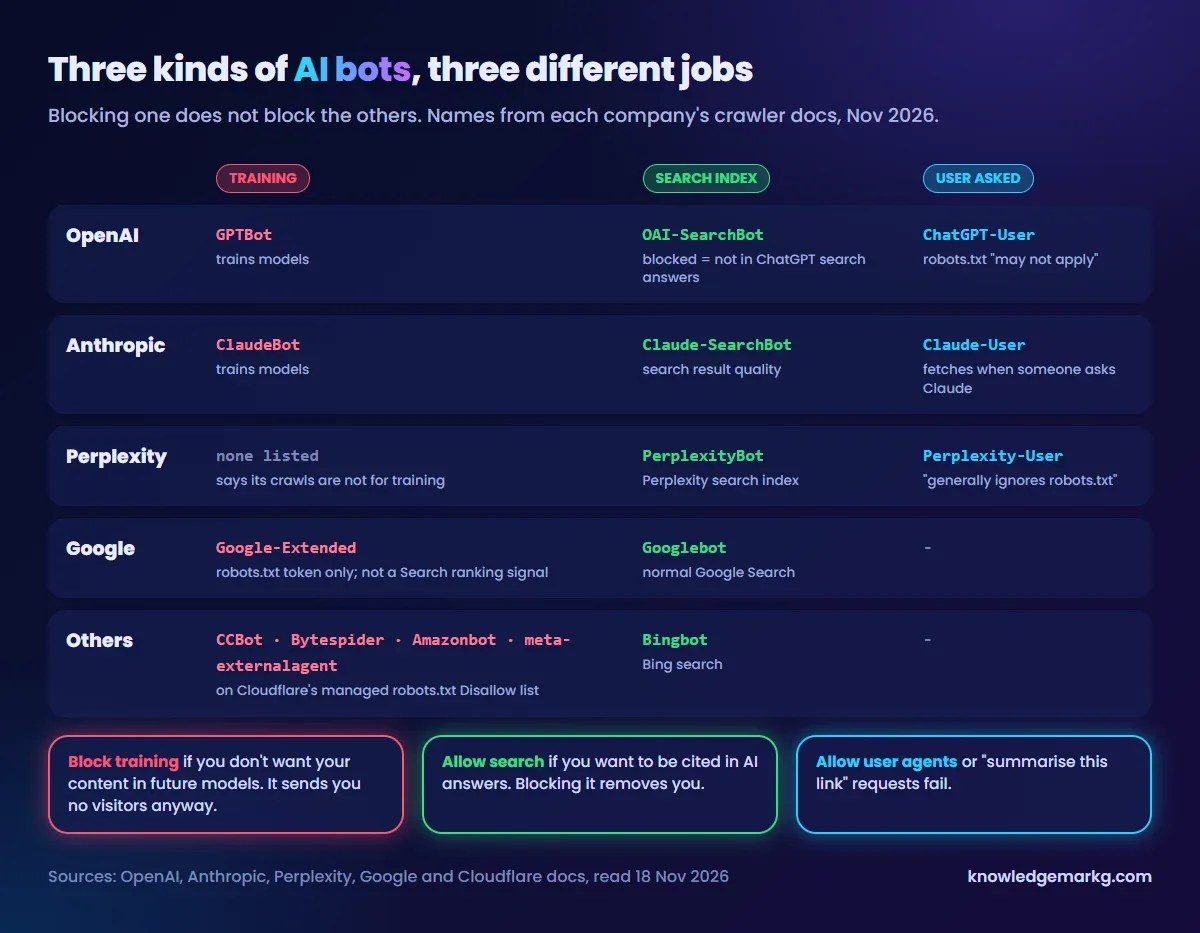
Every big AI company now publishes separate user agents, and their documentation spells out what each one is for:
- OpenAI.
GPTBotcollects training data.OAI-SearchBotindexes pages for ChatGPT search.ChatGPT-Userfetches a page when a user's request needs it, and because a person started it, OpenAI notes that robots.txt rules "may not apply". Changes to robots.txt take about 24 hours to be picked up. - Anthropic.
ClaudeBotis training,Claude-SearchBotimproves search results,Claude-Userfetches for a person using Claude. Anthropic says its bots respect robots.txt, includingCrawl-delay. - Perplexity.
PerplexityBotbuilds its search index and, per Perplexity, isn't used to train foundation models.Perplexity-User"generally ignores robots.txt rules", because a user asked for the page. - Google.
Google-Extendedisn't a crawler at all. It's a robots.txt token that tells Google not to use your pages for Gemini training. It "does not impact a site's inclusion in Google Search". Normal Googlebot crawling is unaffected either way. - Others.
CCBot(Common Crawl, a dataset many models train on),Bytespider(ByteDance),Amazonbotandmeta-externalagent. All four are on Cloudflare's own managed robots.txt block list.
The practical takeaway: "should I block AI bots?" is really three questions, and most sites answer them differently.
What Cloudflare actually returned to each bot
To see the difference, I sent the same request with curl to two sites behind Cloudflare and changed only the User-Agent. Site A is this blog, with no AI blocking. Site B is a company site that has AI training blocked.
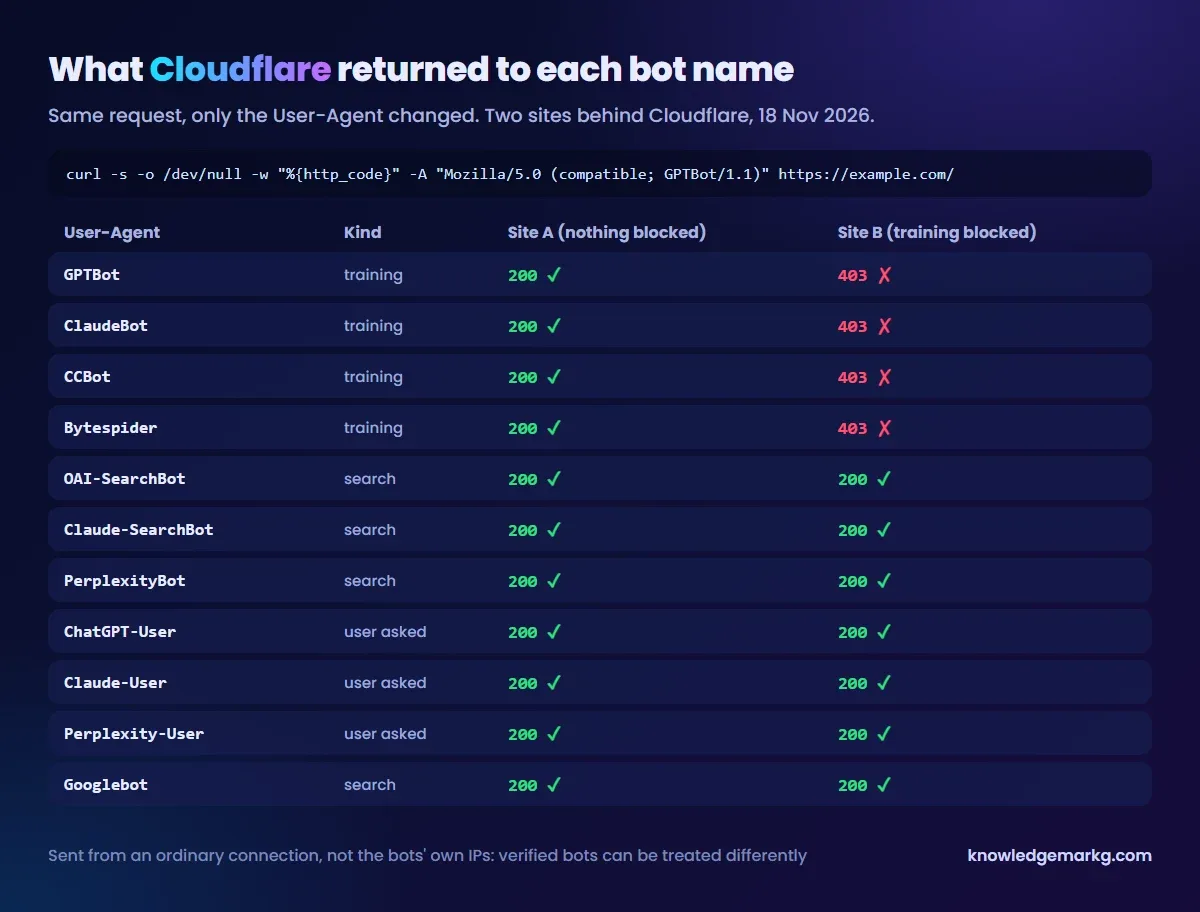
On Site B the four training crawlers got a 403; everything else, including OAI-SearchBot, ChatGPT-User, Claude-User and Googlebot, got a 200. Site B's robots.txt has no AI rules at all, so the block happens at Cloudflare's edge, before the request reaches the server. That's the split you want: the training bots are refused, and the AI search engines can still read and cite the site.
One caveat that matters if you repeat this. My requests came from an ordinary connection, not from OpenAI's or Anthropic's IP ranges. Cloudflare identifies verified bots by where they come from, and its policies cover "Verified bots with that behavior and matching unverified bots". So a spoofed name tells you what the rule does with that name. It doesn't prove how the real crawler is treated. For that, look at the real traffic (next sections). You can run the same test on your own site:
# One bot name
curl -s -o /dev/null -w "%{http_code}\n" \
  -A "Mozilla/5.0 (compatible; GPTBot/1.1; +https://openai.com/gptbot)" \
  https://example.com/

# Several at once
for ua in GPTBot ClaudeBot CCBot Bytespider OAI-SearchBot ChatGPT-User \
          Claude-SearchBot Claude-User PerplexityBot Perplexity-User Googlebot; do
  printf "%-18s " "$ua"
  curl -s -o /dev/null -w "%{http_code}\n" -A "Mozilla/5.0 (compatible; $ua)" https://example.com/
doneWhere the setting is now: AI Crawler and Agent access policies
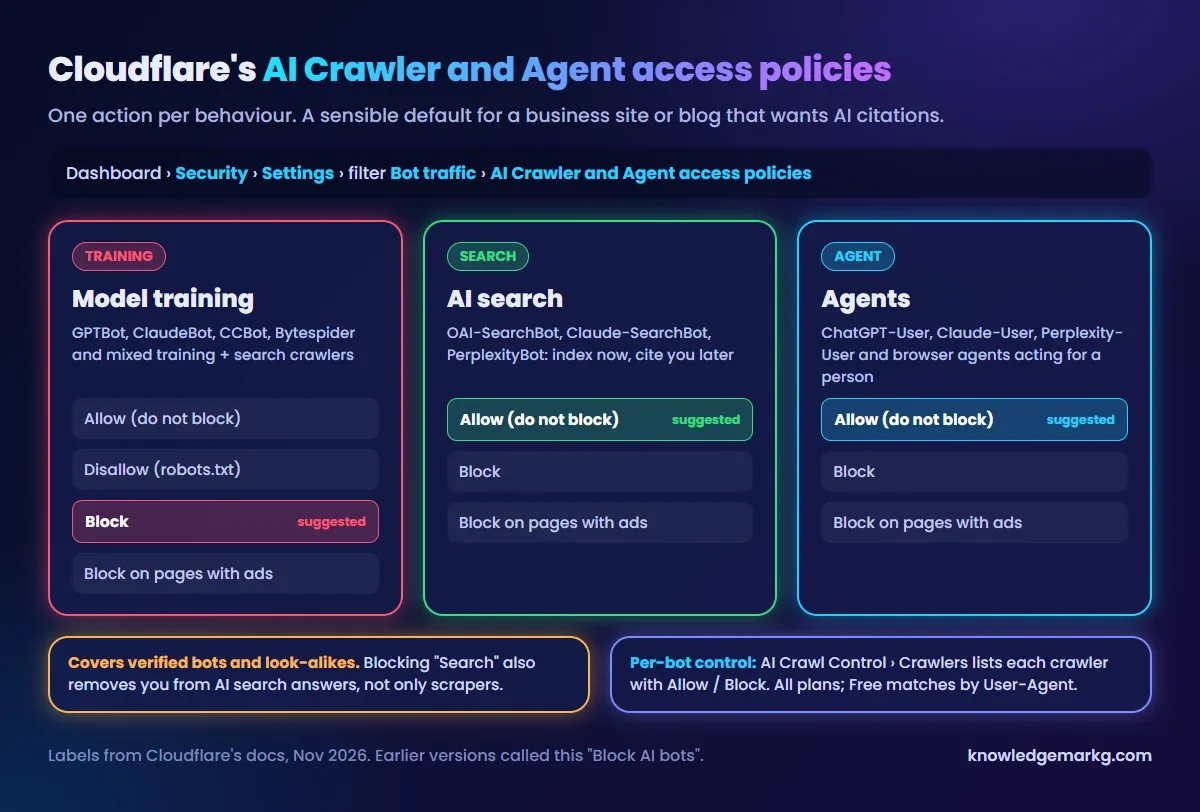
Older guides tell you to flip a single Block AI bots switch. That switch has been replaced. In the dashboard today, pick the domain and go to Security › Settings, filter by Bot traffic, and open AI Crawler and Agent access policies. You set one action per behaviour:
- Training. Allow, Block, Block on pages with ads, or Disallow (which only adds rules to your robots.txt and relies on the bot obeying them). Cloudflare puts mixed-purpose crawlers that do both training and search in this group, so blocking Training can hit them too.
- Search. Allow, Block, or Block on pages with ads. Blocking here removes you from AI search answers, not just from scrapers.
- Agent. Same options. Cloudflare itself recommends leaving personal agents allowed.
"Block on pages with ads" is for sites that earn from display ads and don't want AI tools reading those pages without showing the ads. For a business site with no ads it behaves like Allow.
If you remember Cloudflare announcing that it blocks AI crawlers by default: that applied to the earlier rollout. The current docs say new domains start with Search, Agent and Training all on "Allow (do not block)". Don't assume you're protected. Check the setting, or run the curl test above.
Managed robots.txt and Content Signals
Blocking at the edge and robots.txt are two separate layers. Cloudflare can also manage robots.txt for you (all
plans). With it on, Cloudflare puts its own block in front of your file: a Content-signal line saying
search is fine and AI training isn't (search=yes, ai-train=no), followed by Disallow rules
for Amazonbot, Applebot-Extended, Bytespider, CCBot, ClaudeBot, Google-Extended, GPTBot and meta-externalagent.
Content Signals are a newer, voluntary format with three values: search, ai-input
(using your page to answer a question live) and ai-train. Nothing forces a crawler to honour them, the
same as the rest of robots.txt, which is why the edge block exists. If you'd rather write robots.txt by hand, this
is the equivalent:
# Block AI training, keep search and user-requested fetches
User-agent: GPTBot
Disallow: /

User-agent: ClaudeBot
Disallow: /

User-agent: CCBot
Disallow: /

User-agent: Google-Extended
Disallow: /

User-agent: Bytespider
Disallow: /

# Everyone else, including OAI-SearchBot, Claude-SearchBot and PerplexityBot
User-agent: *
Allow: /

Sitemap: https://example.com/sitemap.xml
Check it with a robots.txt validator before you deploy: a stray
Disallow: / under User-agent: * blocks Googlebot as well.
Per-bot control with AI Crawl Control
If the three groups are too coarse, AI Crawl Control (it used to be called AI Audit) lists each crawler that visited your site, with its request count and how often it ignored robots.txt. Each row has an action: Allow, Block, or Charge (pay per crawl, still a closed beta). Block creates a WAF custom rule for you. It's available on every plan, with two limits on Free: detection is by User-Agent only, and you can't customise the block response.
This is the screen to use for the verified-bot question above. Look at what really arrives, not what a spoofed curl request shows. It's also where you'd allow one mixed-purpose crawler that the Training policy caught.
Why can't ChatGPT or Claude read my website?
This is the other half of the search traffic: owners who never meant to block anything and find that ChatGPT says it can't open their page. Work through it in this order:
- The AI policies. Search or Agent set to Block refuses OAI-SearchBot, ChatGPT-User, Claude-User and the rest. Set them to Allow.
- Bot Fight Mode or a WAF rule. A custom rule matching "bot" in the User-Agent, a country block or a strict rate limit catches AI fetchers too. Check Security › Events for the user agent and the rule that fired.
- A JavaScript challenge. "Under Attack" mode or a managed challenge stops fetchers that don't run JavaScript. The page loads fine in your browser, because you passed the challenge long ago.
- robots.txt. A
Disallowfor OAI-SearchBot or Claude-SearchBot, or a blanket one under*. - Content that only exists after JavaScript runs. If the HTML your server sends is an empty shell,
a crawler that doesn't render scripts sees nothing to quote. Check with
curl: if the text you care about isn't in the response, the bot can't see it either.
Run the curl loop from earlier with your own domain. A 403 or a challenge page for OAI-SearchBot or ChatGPT-User is the answer. A 200 with your content in it means the block is somewhere else, or the AI tool simply hasn't crawled you yet.
What I'd choose, by site type
- Freelancer, agency or local business site. Block Training, allow Search and Agent. You want to be the business ChatGPT names when someone asks for a recommendation. Getting cited depends on more than access; how to get cited by ChatGPT and AI Overviews covers the rest.
- Blog or content site. The same, and measure it. AI referrals show up in GA4 if you set up the channel: see measuring AI traffic in GA4. If AI search sends you nothing after a few months, you've lost nothing by allowing it.
- Paywalled, licensed or ad-funded content. Consider "Block on pages with ads", or block Search as well. You give up AI citations in exchange for keeping the content to your own pages.
- Documentation or support sites. Allow everything except perhaps Training. You want people's AI assistants to give correct answers about your product.
Whatever you choose, it's a setting, not a one-off decision. Look at AI Crawl Control after a month and adjust. If Cloudflare also caches your HTML, why cf-cache-status says DYNAMIC and does Cloudflare cache 404 responses cover the caching side of the same dashboard.

Join the conversation
No comments yet — be the first to share what you think.